Mastering the Canvas Block
The Square Orb Canvas (square-orb/gallery) is the core Gutenberg block for embedding fast, interactive media galleries into posts, pages, and custom post types.
Adding the Block
- Open any post or page in the WordPress block editor.
- Click the + (Add block) button and search for Square Orb Canvas.
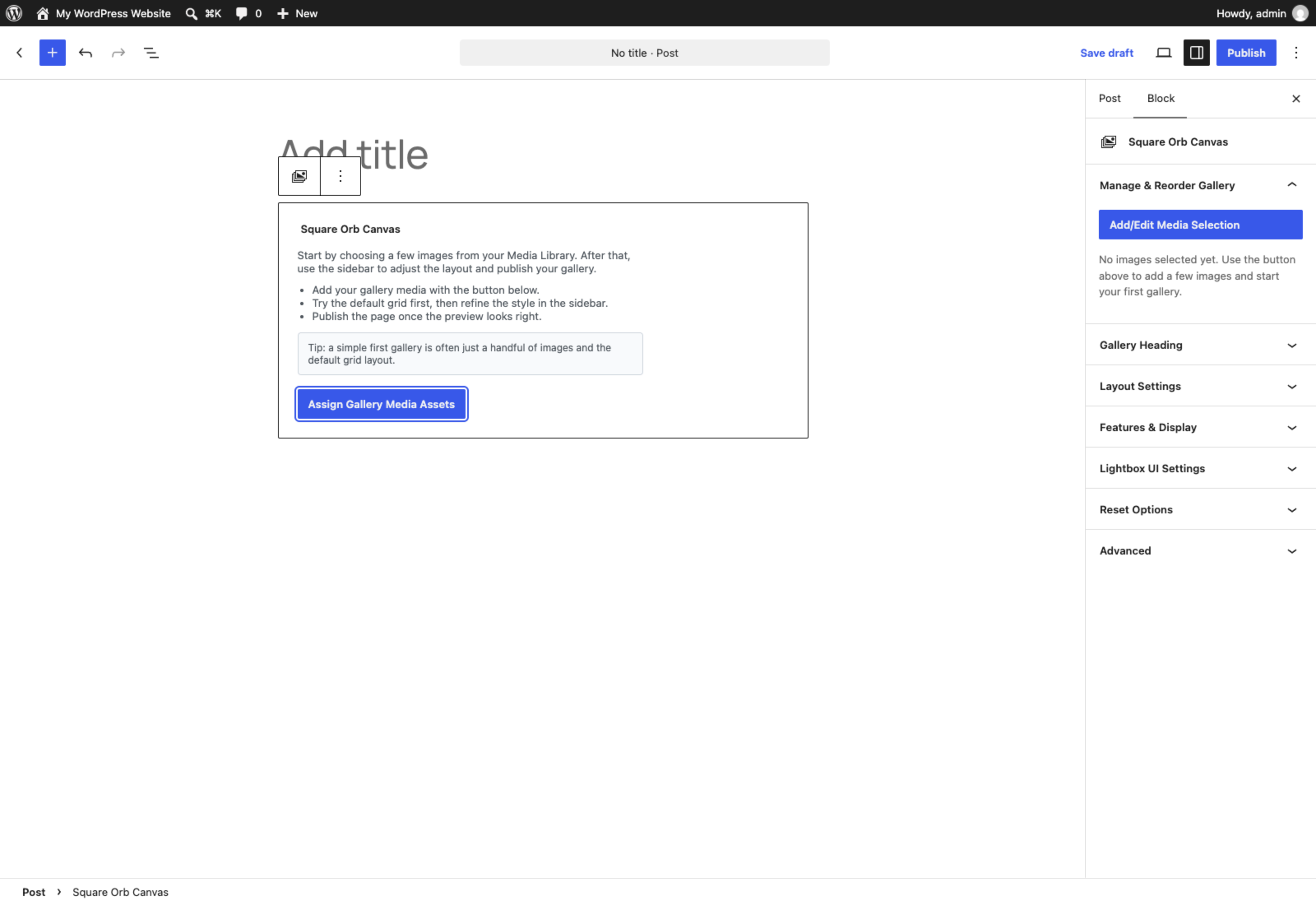
- If no images have been assigned yet, the block displays a setup placeholder with quick-start tips and an Assign Gallery Media Assets button.
Block Settings Sidebar
When the Square Orb Canvas block is selected, the settings sidebar provides six distinct panels:
1. Manage & Reorder Gallery
- Add/Edit Media Selection: Launches the WordPress Media Library modal to select, add, or remove images.
- Drag-and-Drop Reordering: Drag items using the
☰handle to reorder images visually. - Video URL Integration: Each image entry has a dedicated “Video URL” field supporting YouTube (
watchandyoutu.belinks), Vimeo, and direct MP4 URLs. When clicked in the gallery, the lightbox plays the embedded video rather than displaying the static image. - Remove Asset: Click
Xto remove an image from the gallery without deleting it from your media library.
2. Gallery Heading
- Show Gallery Heading: Toggle whether to display an HTML heading above the gallery.
- Heading Text: Enter custom title text. Note: Heading text is content-level and remains unique per block even when the Master Override Switch is active.
- Heading Tag: Choose the semantic tag (
h2,h3,h4,h5,h6, orp). - Heading Styling Source:
Inherit Theme Styles: Inherits your active theme’s typography rules.Use Square Orb Preset: Applies clean, modern, responsive typography.
- Show Divider Under Heading: Adds a subtle horizontal rule below the title.
3. Layout Settings
- Gallery Style: Switch between Perfect Square Grid, Dynamic Masonry, Cinematic Justified Row, Responsive Swipe Carousel, or Interactive Traveler’s Map.
- Desktop Columns: Auto-fill or fixed 3, 4, 5, or 6 columns.
- Mobile Columns: 1 to 4 columns.
- Grid Gap: Spacing in pixels between gallery items (0–50px).
- Corner Radius: Rounded corner styling for image thumbnails (0–100px).
4. Features & Display
- Scroll Animations: Animate gallery items as they enter the viewport.
- Category Filters: Generates filter buttons for WordPress categories assigned to your attachments.
- Smart Search (AI): Adds a live, real-time search input above the gallery.
- AJAX Media Per Page: Initial count of media items rendered on page load (4–100).
- Button Customization: Customize the “Load More” pagination button label, shape (Pill, Rounded, Square, or Theme Default), background color, and text color.
5. Lightbox UI Settings
- Transition Engine Style: Select from 11 animation styles (None, Fade, Blur, Wipe, Curtain, Swipe, Slide, Zoom, Bounce, Flip, Spin).
- Slideshow Controls: Toggle auto-advance and set the transition duration in seconds.
- Gallery Filmstrip: Enable or disable the thumbnail carousel at the bottom of the lightbox.
- Control Buttons Styling: Customize the background, color, and border radius of the viewer controls.
- Media Border & Radius: Adjust frame border width, color, and corner radius.
- Meta & Sharing Toggles: Control visibility of image title, caption, technical EXIF badge row, and social share buttons.
- Overlay Matte Color: Customize the background overlay color with support for RGBA transparency.
6. Reset Options
- Clear Canvas Overrides: Settings customized locally in the block display an
(Local Override)badge. Click Clear Canvas Overrides to wipe all local block customizations and instantly revert to your site-wide Global Presentation Defaults.
Setting Applicability Matrix
To keep the editor intuitive, the block sidebar dynamically shows only the settings applicable to your chosen layout:
| Setting | Grid | Masonry | Justified | Carousel | Map |
|---|---|---|---|---|---|
| Desktop Columns | ✅ | ❌ | ❌ | ❌ | ❌ |
| Mobile Columns | ✅ | ❌ | ❌ | ❌ | ❌ |
| Grid Gap (Spacing) | ✅ | ✅ | ✅ | ✅ | ❌ |
| Corner Radius | ✅ | ✅ | ✅ | ✅ | ❌ |
| Scroll Animations | ✅ | ✅ | ✅ | ❌ | ❌ |
| Category Filters | ✅ | ✅ | ✅ | ✅ | ❌ |
| Smart Search (AI) | ✅ | ✅ | ✅ | ✅ | ❌ |
| AJAX Media Per Page | ✅ | ✅ | ✅ | ✅ | ❌ |
| Load More Button Styling | ✅ | ✅ | ✅ | ✅ | ❌ |
| Lightbox Transitions & Controls | ✅ | ✅ | ✅ | ✅ | ✅ |
| Asset Protection | ✅ | ✅ | ✅ | ✅ | ✅ |